
FileSync
File management made easy
Create, deploy, and manage configuration files across your enterprise.

A central console to deploy files while maintaining version history.
Substitute environment-specific variables while deploying.
Quickly identify discrepancies across your network.
25%
Reduction in IT administration costs
20%
Decrease in solution deployment times
25%
Reduction in IT adminstration costs
20%
Decrease in solution deployment times
How FileSync Works


-
Choose a file set
A central defined repository of all your files in one place. Simply choose the set of files you would like to work with.
-
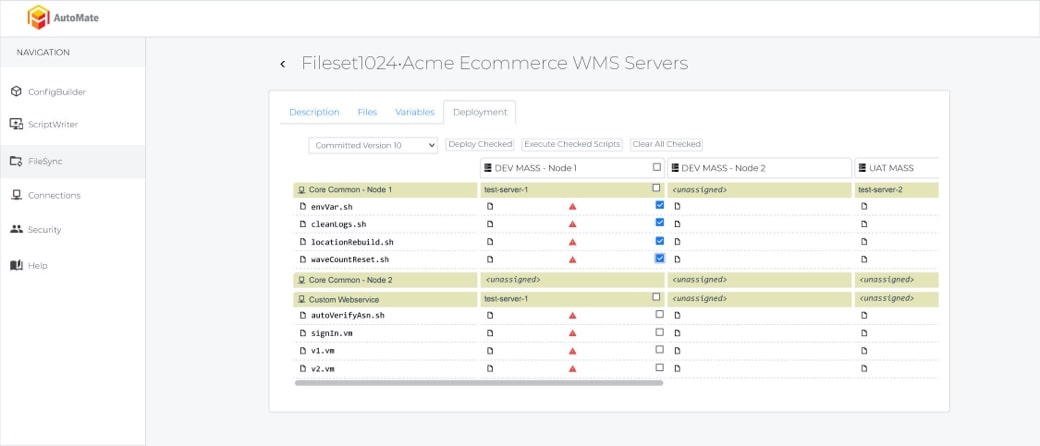
Select files to deploy
All within a central console, view your labels and reports then quickly identify which files to redeploy.
-
Execute sync
With a simple click of a button, commit your new file changes across all application servers in use.

Quickly deploy files
Gone are the days of spending precious hours scripting files to deploy. Now deploy files across your enterprise in seconds.
Say goodbye to manual work
With FileSync, you no longer need to manually sort through each file and server one by one saving precious time on what once was tedious work.

What is FileSync?
FileSync is Veridian's file management and deployment tool for Manhattan Associates WMS and OMS environments. From a central console it creates, deploys and manages the files that a supply chain system depends on, such as labels, reports and configuration files, across every application server in your enterprise, while maintaining version history and substituting environment-specific variables as it deploys. FileSync is part of the AutoMate suite with ConfigBuilder and ScriptWriter.
What problem does it remove?
A Manhattan Associates environment runs on many servers, and each of them needs the right version of the right files. Deploying a changed label or report traditionally means scripting the copy, editing environment-specific values by hand, and then checking each server one by one to make sure the change landed. It takes hours, discrepancies between servers go unnoticed until something prints wrong, and nobody can say with certainty which version is where. FileSync replaces that manual work with a single console, a single click and a complete history.
How does FileSync work?
- Choose a file set. FileSync holds a central, defined repository of all your files. Pick the set you want to work with.
- Select the files to deploy. View your labels, reports and configuration files in one console and identify which need to be deployed or redeployed.
- Execute the sync. With one click, commit the new file versions to every application server in use. Environment-specific variables are substituted automatically during deployment, and every version is kept.
Which Manhattan Associates products does it support?
FileSync supports Manhattan Associates WMS and OMS environments, on every application server that runs them.
Before and after
| Task | Manual approach | With FileSync |
|---|---|---|
| Deploy an updated shipping label | Script the copy, edit environment values, touch each server. | Select the file, click, deployed everywhere in seconds. |
| Find out which server has the wrong version | Log in to each one and compare. | Discrepancies across the network are identified quickly from the console. |
| Roll back a bad change | Hope someone kept a copy. | Redeploy the previous version from history. |
| Promote files from test to production | Manually change host names, paths and other environment values. | Environment-specific variables are substituted automatically. |
The results reported on this page from Veridian's use of FileSync are a 25% reduction in IT administration costs and a 20% decrease in solution deployment times.
Who uses FileSync?
System administrators and support teams use FileSync day to day to deploy and manage files without manual scripting. Implementation teams use it to promote labels, reports and configuration files from development through test to production during an implementation. Together with ConfigBuilder for configuration and ScriptWriter for testing, it gives a Manhattan Associates environment a controlled, repeatable release process.
How do I see it?
Request a demo to see FileSync deploy a file set across multiple servers, or call (770) 225-1750.
Frequently asked questions
What does FileSync do?
FileSync creates, deploys and manages files such as labels, reports and configuration files across all application servers in a Manhattan Associates WMS or OMS environment from a central console, with version history and automatic substitution of environment-specific variables.
Which systems does FileSync support?
Manhattan Associates warehouse management and order management environments.
Does FileSync keep a history of deployed files?
Yes. Every deployed version is retained, so a previous version can be redeployed if a change needs to be rolled back.
How does FileSync handle differences between environments?
Environment-specific variables are substituted automatically during deployment, so the same file set can be promoted from test to production without manual edits.
What results have been reported?
The figures shown on this page are a 25% reduction in IT administration costs and a 20% decrease in solution deployment times.
See our automation tools for yourself
Ensuring a successful implementation has never been easier with the help of Veridian’s modern approach to supply chain technology, expert staff, and automation tools.

See our automation tools for yourself
Ensuring a successful implementation has never been easier with the help of Veridian’s modern approach to supply chain technology, expert staff, and automation tools.